

What is the Inbox Placement Monitor?
The Inbox Placement Monitor is inbox placement testing that never stops. Instead of building a special test message and sending it once, you add our seed addresses to the campaigns you were already going to send. Every copy that reaches a seed is reported in your dashboard within minutes, showing whether it landed in the inbox, the spam folder, a Gmail tab, or Microsoft’s Focused/Other folder. It covers Gmail, Google Workspace, Microsoft 365, Outlook.com/Hotmail, Yahoo, AOL, iCloud and Zoho, using more than 70 seed addresses across consumer and business mailboxes.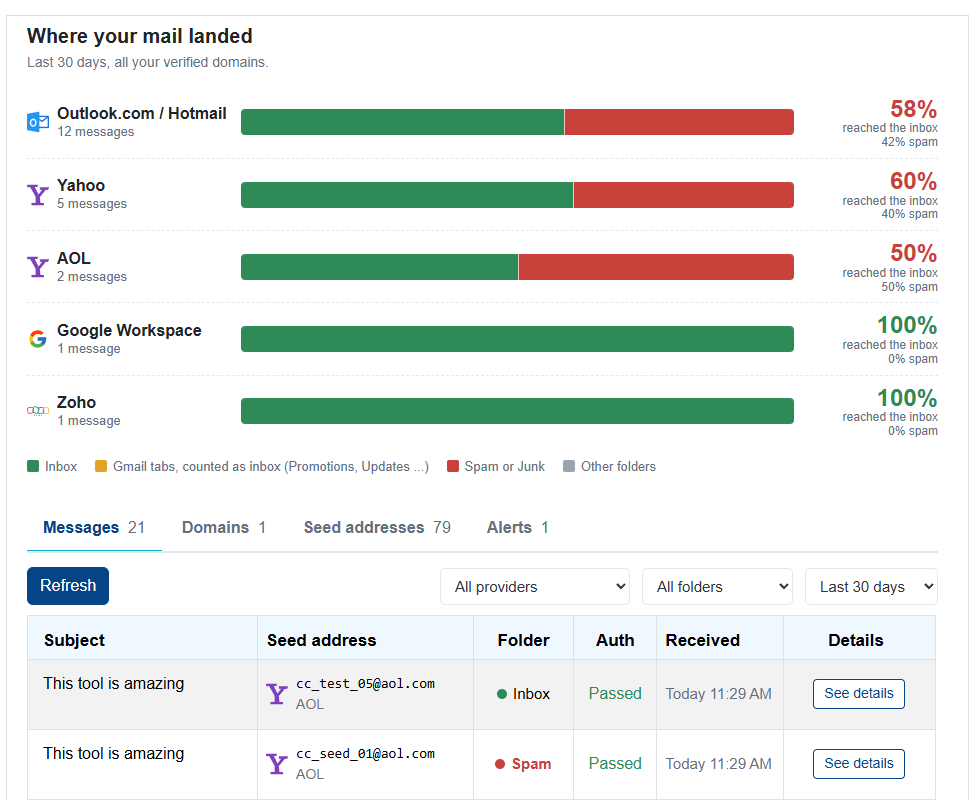
How is it different from the Inbox Placement Test Center?
A one-off Inbox Placement Test tells you where one message landed at one moment. That’s useful before a big send. The Inbox Placement Monitor answers a different question: where is the mail I’m actually sending landing, day after day?- No test codes – Messages are matched by your verified From domain, so your campaigns go out unchanged.
- No SMTP passwords or API keys – The seeds receive the same copy your subscribers receive, sent by your own platform.
- Continuous, not a snapshot – Every campaign that includes the seeds adds to your 30-day picture, so you see a change in placement when it happens, not at your next scheduled test.
How does it work?
- Add your sending domain – Enter the domain you send From, then prove you own it by adding one DNS TXT record at
_cc-verify.<your domain>. - Add the seed addresses to your sends – Put our seed addresses into your normal campaigns as regular To recipients, the same as any other subscriber.
- See where it landed – Each copy that reaches a seed appears in your dashboard within minutes, with the folder or tab it was placed in.
Why do I have to verify my domain?
Because the monitor works from the mail you send, it has to know which messages are yours. Only mail from domains you’ve verified appears in your dashboard. Subdomains of a verified domain are included automatically, and verified domains are re-checked weekly to make sure the DNS record is still in place.What you see for each message
- Placement – Inbox, Spam/Junk, the Gmail tab it was sorted into (Promotions, Updates, Social or Forums), or Focused/Other at Microsoft.
- Authentication results – Whether SPF, DKIM and DMARC passed for that copy.
- Sending IP – The IP address the message was delivered from, so you can tell which part of your infrastructure carried it.
- Headers and .eml download – The full message headers and the original
.emlfile, ready to inspect or share with your ESP or a consultant.
The “Where your mail landed” chart
The dashboard summarizes the last 30 days by provider: the percentage of your messages that reached the inbox and the percentage that went to spam. Gmail tabs count as inbox, because a message in Promotions or Updates was delivered and is visible to the subscriber. If one provider starts trending toward spam while the others hold steady, you know where to look first: authentication, the sending IP, or the content of that campaign.Alerts
You don’t have to keep the dashboard open. Set up alerts and we’ll email you when something goes wrong:- Lands in spam – Any copy that ends up in a Spam or Junk folder.
- Misses the inbox – Spam, Gmail tabs such as Promotions, or Outlook’s Other folder.
- Inbox rate drops – Your inbox rate at a provider falls below a level you choose over the last 24 hours.
- Authentication fails – SPF, DKIM or DMARC didn’t pass.
Who can receive alerts?
To keep alerts from being used to send unwanted mail, each alert can go to up to five people, and each recipient must be one of:- You – The account owner’s email address.
- A team member – Anyone on your Campaign Cleaner team. Pick them from the dropdown when creating an alert.
- An address at a verified domain – Any address at a domain you’ve verified.
Alert-only domains
If you want to send alerts to addresses at your company domain but don’t send campaigns from it, add it as an alerts-only domain. It’s verified the same way, but it isn’t monitored for placement and doesn’t count toward your monitored domain limit.Plans and limits
The Inbox Placement Monitor is included with the Inbox Placement Tester plan and The Works. Both include:- Up to 5 monitored domains
- 1,000 messages per billing period
- 30 days of message history
- Alerts
If your subscription ends, monitoring pauses after a short grace period and we’ll let you know by email. Your domains and settings are kept, and monitoring picks up again when you resubscribe.